Showing posts with label computer. Show all posts

Friday, 10 May 2019

BARBARA'S 75th BIRTHDAY

Another year, another birthday.  Life rolls along much the same. Both Iain and I enjoy good health for our years.  We never take that for granted as increasingly people our age start to show signs of wear and tear, so to speak.


Having spent quite a bit of time at the computer this past week (finishing off a brochure for the Milngavie Music Club) I decided to down tools and have the day off.  In the early morning I had sent (over the internet) all the image and text files to the printer but apparently it did not arrive in their Inbox.... don't know why.  (I am still on that learning curve but don't usually have a problem.) Rather than struggle with a 'workaround' (I am getting good at this...) I decided to simply jump on the train and pay a visit to their office in the centre of Glasgow.

It has been ages since I was in town and, as always, I enjoy being among all the good Glasgow folk going about their daily lives.  Today was just typical!

[1] I am often asked directions, usually when I a waiting to cross at the lights.  If I am going in the same direction I simply walk along with the person(s) and then point out their route.  Today was no different: an elderly lady, half my height, asked me directions and as we were going the same way, we fell into conversation.  She was from Dublin and looking for a city centre shop.  As we parted it was a case of me saying "Cheerio" (a very Glasgow departing expression which I picked up years ago) and she responded with "Goodbye and God Bless".  So very Irish; so very nice!

[2] In the printer's office I gave my memory stick of files to the young lassie (maybe about 21 years old) who confirmed that everything was there.  Job done.

We chatted a bit about us both being Mac computer users and I mentioned that I had been doing this sort of desktop publishing work for quite a few years (to be exact it is 30 years!).  I said that I used to make a habit of delivering the files in person because I would know for sure that they got the material (i.e. it nailed a recurring problem in the pre-Internet days of  "It hasnay come" or "We didnay get it." [when I sent the disk in the post].

I explained to her that what I was delivering was either a floppy disk or its successor, a 3 1/2 inch hard disk for A drive. I then became aware of a blank look on her face.... "Uh-h-h... do you know what I am talking about?"   Answer: "No!" 


So does reaching the ripe of age of 75 years make me feel old?  Well, no... not really, but talking to these youngsters about floppy disks certainly did!


Tuesday, 28 November 2017

YOUTUBE NOTIFICATION ABOUT INAPPROPRIATENESS: BIG BROTHER IS WATCHING YOU!

Last week I received an email from You Tube saying that they had removed a video from my Playlist as they deemed it "inappropriate".

Uh-h-h-h...? Excuse me? What are you talking about?!!!

The following screenshot is the letter about the offending video.  

 
The offending video apparently is a film of the book 'Riddle of the Sands' which, as Wikipedia states:

"The Riddle of the Sands: A Record of Secret Service is a 1903 novel by Erskine Childers. The book ... is an early example of the espionage novel and was extremely influential in the genre of spy fiction. It has been made into feature-length films for both cinema and television."
It is about a man's adventure in a sailing boat off the Frisian Islands (coast between The Netherlands and Germany). I must have looked some part of it some years ago and saved it to my computer.  There are a dozen or so film versions of it on Youtube.  I don't even know which video it was as it is no longer there.
 
Not even knowing what a playlist was and not realizing this video was on it (along with Beethoven and Bach videos) I did my best to over-ride rising panic and got on to Google to figure this out. 

Whose criteria operates here? I can tell from the email that it comes from USA as it begins with "Hi....".  I have learned that spam emails always begin this way so I simply decided it was spurious and didn't touch it. I did not delete it either as I wanted to keep the email for reference.

A couple of days later I got a second email ... actually 3 emails, i.e. same one triplicated.

They thanked me for appealing against the decision  ... I had not .... stating that "after further review, we have determined that your Playlist doesn't violate our Community Guidelines."

I am still none the wiser.

* * * * * * * * *


It reminds me of an image I had taken down off this blog in a post of November 21, 2013.  It was the symbol which was used by a right wing German movement lead by a man whose name begins with H.  I posted a photo of a Rudyard Kipling book and this symbol was embossed in gold on the front.  It is a sacred Hindu symbol in the form of a rotationaly symmetrical arrangement (a cross) with four equally spaced legs of identical length each bent at 90 degrees in a uniform direction to create a pattern akin to a four-armed spiral.

It is still there with all of the images removed.   Doing a search on this site using word 'Kipling' brings it up as well as '4 legged symbol' word.

M-m-m-m .... interesting.  It is almost exactly the same time of year that these events occurred.


Thursday, 1 May 2014

INDY: MAY DAY

Alastair, Dawn and Indy have arrived and will be with us for 3 weeks.  Indy is going to be 3 in August.  Here are a few photos of him caught when one gets him to pause in his very busy activity! He chatters away and has lots of imaginative play e.g. with Lego.  

Today we going to Glasgow's Lego Store in Buchanan Galleries, city centre (en route to the Apple Store to look at an upgrade for Grandma's computer - ya beauty!)


Sunday, 13 April 2014

WHAT'S IN A NAME?

Does a name make a difference?  Does a rose by any other name smell as sweet?


Yes.  I wish to put a case that it does make a difference. Here is an example:

This logo above belongs to a website that registers domain names.  One has to pay and in doing so one gets an email address that can be used on the internet. (Oops ... that's a tautology: where else would one use an email address....?)

Anyhow I have been on a very steep learning curve this past week: my email stopped working.  It turns out that my payment for its use had expired.  Fair 'nuff. However I did not pick up this fact until many, many hours of trying to figure out the problem.  The good news is that I learned a lot about computers in the process; the bad news is that it took me ages to get to the bottom of the problem.  (I am of the School of Thought: 'I am going to sit here til I figure it out'.)

What happened was that this domain registration company based in the States had sent me an email about the expiration date but it had gone into my Junk Mailbox (not unreasonably with a name like that!) Secondly I did not recognize the name at all so even then did not act, and thirdly, once I did act the bank fraud people were on to me about my payment.  Again, quite understandably.

I am now sorted (with the help of Alastair).  I rest my case.


Sunday, 6 October 2013

LE CONCEPTEUR

Update with clarification:  This post was originally written in April 2010. I have amended it and the post, it was pointed out to me, is now appearing as a post of October 2013, i.e. 3 years after the event described.


Today we were very much looking forward to this gentleman - Michael Virlogeux - visiting with his wife. He was to give 2 lectures organised by EISIS (The Institution of Engineers and Shipbuilders in Scotland) as noted here. But the volcano in Iceland started spewing ash and ... after an hour by hour watch and wait ... the lecture had to be canceled as Monsieur Virlogeux was stuck in Paris at the airport unable to fly to Glasgow.

A structural engineer of over 100 bridges this bridge is one he designed and one that everyone finds stunningly beautiful!

This is the Millau Bridge in the south of France. Built in 2004 it is a viaduct spanning across the Tarn Valley."The engineering feat has drawn rapturous praise for its elegant lines, which allow it to blend seamlessly into the surrounding region famed for its gorges, medieval villages and Roquefort cheese." — Denis Thomas and Joelle Diderich, Reuters

[ ....................................THE MISSING LINK ...........................]

[The link above has been removed 06.10.13 by request of Google support.]


Hopefully another trip will be planned and that the forces of nature do not impede the plans!


____________________________________________
Map: from Paris-World Guides

Photos: from www.jfccivilengineer.com/le_concepteur.html


Friday, 27 September 2013

APPLE PICKING

Friends of ours were away for a week only to find when they returned home that their house had been burgled. The windows had been jemmied with a crowbar but not opened however the front door was given the same treatment leaving damaged door and frame around the lock.  It wasn't successful either so the lower panel of the door was kicked in and that was the entry point.

Anything taken? One or two things of no value. Like most of us ... there is nothing to take! No diamonds ... no cash ... no cheque books (even we who OWN them can't get use of them in shops!) No mess left apart from damaged doors and windows.

So what are they after? Silverware? No ... not desirable these days apparently.

It's Apple products!  iPhones, iPads and the like!


It's called "Apple Picking" particularly on subways and public areas. Welcome to the world of iCrime.


Thursday, 14 March 2013

MAC COMPUTER: TO CLEAN THE KEYBOARD

I spilled a glass of wine on to the keyboard and was forced into doing a spot of spring cleaning.  Badly needed!

There are instructions on how to clean a keyboard on Utube. I simply followed them as described below.  It is very, very easy and you cannot come to any harm.  I suppose it would apply to any keyboard. Mine happens to be a Mac.


[1] Unplug the keyboard. In good light take a photo of the whole keyboard making sure you can see the symbols clearly; my photo could have been a little sharper.  

[2] Prepare a bowl of warm soapy water (use ordinary washing up liquid). 

[3] Using a letter opener or similar flat, narrow implement pop off the keys.  It is easy and they don't break. Insert the implement under the centre and lever it upwards. Pop!  Don't worry about remembering where everything goes; your photo will keep you right.

[4] Put the keys in the basin of water and wash. Rinse off the suds and lay them out on a towel to dry.  Make sure the centre cylindrical core is dry.  Maybe use a Q-tip to get out all the dust and crumbs from the keys that have springs.

[5] Clean the keyboard using soapy water and a cloth or cotton wool.  Maybe isopropyl alcohol is OK but I couldn't find any place that sold it.

[6] When bone dry replace all the keys using your photograph for guidance. Maybe leave overnight?  I didn't and everything was fine.

Extra thoughts: 

[1] If a key doesn't work, check that it is on the right way around!  I had the space bar on backwards! (The slope goes to the back. The springs were sloppy until I turned the whole thing around.)

[2] Occasionally tip the keyboard over and shake out crumbs and fluff.  

[3] If a single key ever sticks or is flaky when pressed, think nothing of popping it off to check underneath.  I have now learned - it is all amazingly easy... and effective!


Saturday, 19 January 2013

MAIL 5.3 MENU BAR MISSING (MAC): SOLUTION

My computer is Mac OX 10.7.5.  The Mail (email) program has been upgraded.  I could open up Mail 5.3 but there was no Menu Bar.  (I could quit by pressing Control Q.) 

When opening it up, it flashed and then the whole screen was taken up by the Mail window.


 Alastair's Art

I sorted the problem by the "empirical" method, by that I mean I tried clicking on various keys and the following worked:

[1] Hold down the Shift Key.  Keep holding it down.
[2] Click on Mail in dock to open it up.
[3] Place cursor at top of the screen so that when the Menu bar appears and then disappears you are ready to quickly do [4]
[4] Click wherever you can when menu bar flashes before it "disappears"

Fixed.


Friday, 21 September 2012

WORKAROUND: MAC SAFARI DOES NOT ACCEPT FLASH

This is a Mac 10.7.4 and I operate Safari 6.0 as my normal brouser.  I have been in the habit of downloading BBC iPlayer files on the to computer and am having trouble these days.  The problem appears to be a Safari problem. I don't think it is a BBC problem but I may be proved wrong here.

This is the message that appears.  When I download Flash 11.4  it doesn't recognize that it is there.


First the good news: I also have Chrome 21.0 and Firefox 15.0.1 which I use as browsers.  They work fine, i.e. dowload absolutely no bother. Therefore this is the workaround.


The bad news: from reading all the very good stuff that is on the web about this problem it would appear that Flash is "old technology".  Things are moving on ... where and in what way I do not know. 

Wednesday, 23 May 2012

MOOG SYNTHESIZER WORKS ON MAC

This Google Doodle appeared this morning when I opened up my Mac.  I use Safari as browser and thought I would have a go at seeing what this GOOGLE logo is about.  Usually they are fun and funky.  This is all that and much, much more!
Reading comments on other sites it would appear a lot of people can't get it to work for one reason or another.

For the record I am making a post out of this as a form of FEEDBACK.  This  DOODLE works! 

It is a synthesizer (and the doodle has been created to celebrate the man, Bob Moog, an engineer, who invented the Moog synthesizer.  (Today he would have been 78 years old.)

Using the mouse for positioning, the white keys sound, the black keys sound; all the oscillator knobs do things; the on/off toggle switch works, the roller volume works, and it is possible to make a short (very) recording by clicking on the red button on the reel-to-reel recorder on the right. The dial lights up and the pause button also works!

What a tricky bit of technology!  Full marks to the Google people!  (Who writes this stuff?!!)


Tuesday, 6 March 2012

MAC UPGRADE - THE TECNICAL STUFF

I have successfully managed to upgrade the software for my Mac (OS X) which I purchased 6 years ago.   What I have proved is that it is, indeed, do-able.  With a fair amount of searching on the internet every time I came across a hurdle - and there were a few - I found solutions on the internet simply by googling my question enough times using various keywords.

As I found my searches very helpful I wish to pass on some information that might help the next person in my position.  Update:  I continue to come across odd (small) things which have been changed i.e. behave differently.  As I successfully sort them, I post the problem and the outcome or workaround at the end of this post.

This shows the type of machine I have which is an iMac. This website helps to identify the type of computer you have. 

I upgraded from Tiger to Leopard and then to Snow Leopard.  Now all was well, i.e. didn't affect anything negatively, i.e. speed was better but no files or software were affected.

Then I upgraded to Lion.  Now I was told ahead of time, and there is lots on the net about this, you lose certain types of software, i.e. "we [Mac] do not support this software" message comes up.  This is a shock if you are not prepared.  I used the desktop publishing software Quarkxpress 6.2 and it gave me 7 days' notice to say "You will no longer be able to use this software."  Too right.  A big Do Not Enter sign is across the icon.  End of the line!  (I replaced it, for £20.00, with iPages which is good enough for the type of work that I do.) 

Worse, was that the same happened for Photoshop CS2 that I was using but no 7 days' notice. Again the reasons are all on the net in various discussion sites.


The good news, however, is that it is possible to upgrade to Photoshop CS5.1 and I did this successfully.  Because I had the old software CD with the serial number I signed into the the Apple Account using this serial number, bought the Upgrade (I did not have to buy the whole new suite) and it accepted it with no difficulty.  I downloaded it off the net as opposed to buying the boxed CD and it was fine.  Well ... nearly fine.  The only thing to say is that their instruction run scheme doesn't quite match what you see on the screen but by guessing what they mean it worked.  And yes, I am very happy with the final "functionality"!

So the moral of the story is: probably best to upgrade sooner rather than later.  My stuff was 5 years old and, I guess, that is pretty old for today's software!

March 15, 2012: NO SOUND (after upgrading to Lion).  Solved this way: Mac System Preferences,  clicked the "sound" icon.  There are 3 tabs in Sound which are "sound effects", "output" and "input." Click "output".  The Mute box was ticked; untick it.  That sorted the problem.

April 3, 2012:  SCANNER WON'T WORK.  My scanner is a HP Photosmart C3180.  Now Apple and the Hewlett Packard websites have addressed this problem and eventually I was able to scan.  My workaround:  Turn scanner on (and you get error saying not connected).  Go into the Mac System Preference - Print/Scan - Open Scanner.

April 15, 2012:  WHEN CURSOR  TOUCHES TOP LEFT CORNER OF SCREEN THE SCREEN DISAPPEARS AND "DASHBOARD" SCREEN APPEARS: You need to know the jargon here: this is a manifestation of HOT CORNERS.  What's that?  When the cursor touches (accidentally, in my case)  the upper left corner of the screen it caused the aforesaid action and doing it again toggled the action (i.e. went back to the way it was).  Solution: Click on Apple - System Preferences - (Personal) Mission Control - Hot Corners (bottom, lower left). This shows "Active Screen Corners" Deactivate ( " - " ) or change. Done!


Tuesday, 25 October 2011

5 WAYS TO SPEED UP YOUR MAC

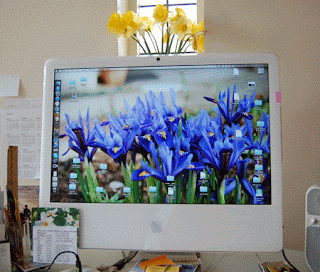
As of this month my computer is 6 years old. It is an iMac with a 24 inch screen.


Lately it has been a bit slow and I have been on the internet to see what measures can be taken to either see what is causing this and/or speed things up.

Naturally, my first step is to find a youngster who talks the lingo! U-Tube has lots of videos. This youngster, apart from talking rather quickly, gave a good demonstration (6.21 minutes) of how to speed up your Mac in Five Steps, namely:

1. Install more RAM
2. Keep files and folders to a minimum
3. Use a maintenance tool [App] once a month
4. Remove unwanted System Preference panes from System Preference list
5. Remove unwanted logon items


For the record: until I get around to Number 1 which involves purchasing this stuff (called a module RAM memory) here I can report that Number 4 worked well. He talks about it at 3.34 minutes into the video. He demonstrates the method: go into System Preferences then go to the bottom of the screen where it says "Other" (If it is not there at the bottom of the list showing: Personal, Hardware, Internet & Network, System, then there are none.) To remove them, right click on the icon (having put in your password when asked).

I found that I had a Flash icon there. I removed it and it has made a big difference! When talking to the lad in the Apple store today, he says to me "Flash is memory-hungry". So now I know....


Monday, 23 May 2011

O2 PHONE BILL: ZARKOV WORK-AROUND

The Scientific Method of Testing has to be A Good Thing! Generally speaking I hate 'problem solving' so methodical testing, i.e. changing one variable whilst keeping the rest constant, is not my first instinct when trouble-shooting.

However my use of computers and all the associated technology has definitely made me more scientific. By that I mean, when I come across a problem (after making a cup of coffee) I make an attempt at fixing it. I always start out by "googling".

Therefore ... the following is the result of one such exercise which I offer for other web users and as an aide-memoire to myself.

Checking your O2 phone bill on-line

[1] To view your O2 phone bill (in the UK) on the internet (you will have registered i.e. established your username and password ... and know they are correct) you click on

http://www.o2.co.uk/myo2

[2] If you get an security message coming up saying that the following site

zarkov.shop.o2.co.uk

is not secure, do not panic. There is a lot of chat on the web (several years ago) about this but here is what I have discovered ... and solves the problem. I did not click on it (and, indeed, it may be OK) but this worked on my Mac OS 10.5.8:

[3] The problem lies with the browser:

[3a] When using Chrome browser (the default one in their email link) the message is a red box exclaiming "The site's security certificate is not trusted!"

[3b] When using Safari browser the error "can't verify identity" comes up.

[3c] When using Firefox it worked.

[4] I don't know anything about zarkov and did not click on the link. Maybe someone can shed some light on this!

Monday, 27 September 2010

TECHNOLOGIAL TROUBLES

Brian E sent me this* ... which I just have to post as we all could do with a laugh just now! This is a Florida visitor ... looking for the mouse! Ho, ho!

Computer problem in Florida / A True story

TECHNICAL SUPPORT: "How can I help you?"

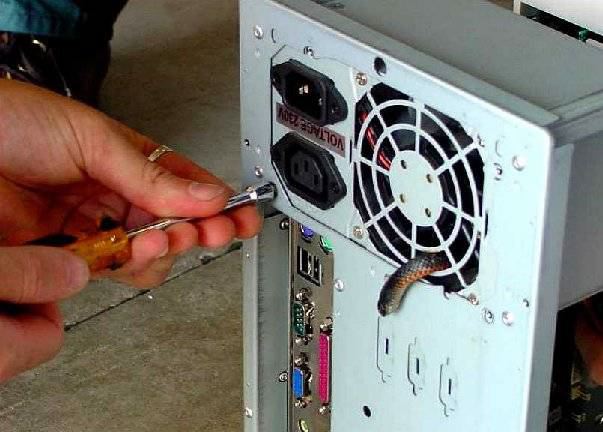
FEMALE CALLER: "Last night my computer started making a lot of hissing noises at me so I shut it down. This morning when I turned it on the computer started hissing and cracking, then started smoking and a bad smell, then nothing."

TECH SUPPORT: "I will have a technician come over first thing this morning. Leave the computer just like it is, so they can find the problem and fix it, or change it out with another computer. Give me your address; phone number and the technician will be there just as soon as he can."

When the technician got there, the lady showed him where the computer was, said what happened to it. This is what the technician found wrong.

And you thought YOU had computer problems!!!


__________________________________________________________
* Photos: Apologies to whose source this is. It seems to be floating about the internet.